
What Equipment Do You Need for Online Quran Classes?

One of the most practical questions families ask before starting online Quran classes has nothing to do with curriculum or teacher qualifications. It is simply: what do I actually need to set this up at home? The good news is that the list is shorter and cheaper than most people expect. This checklist walks through every item worth considering, from absolutely essential to genuinely optional.
Essential: A Device With a Camera and Microphone
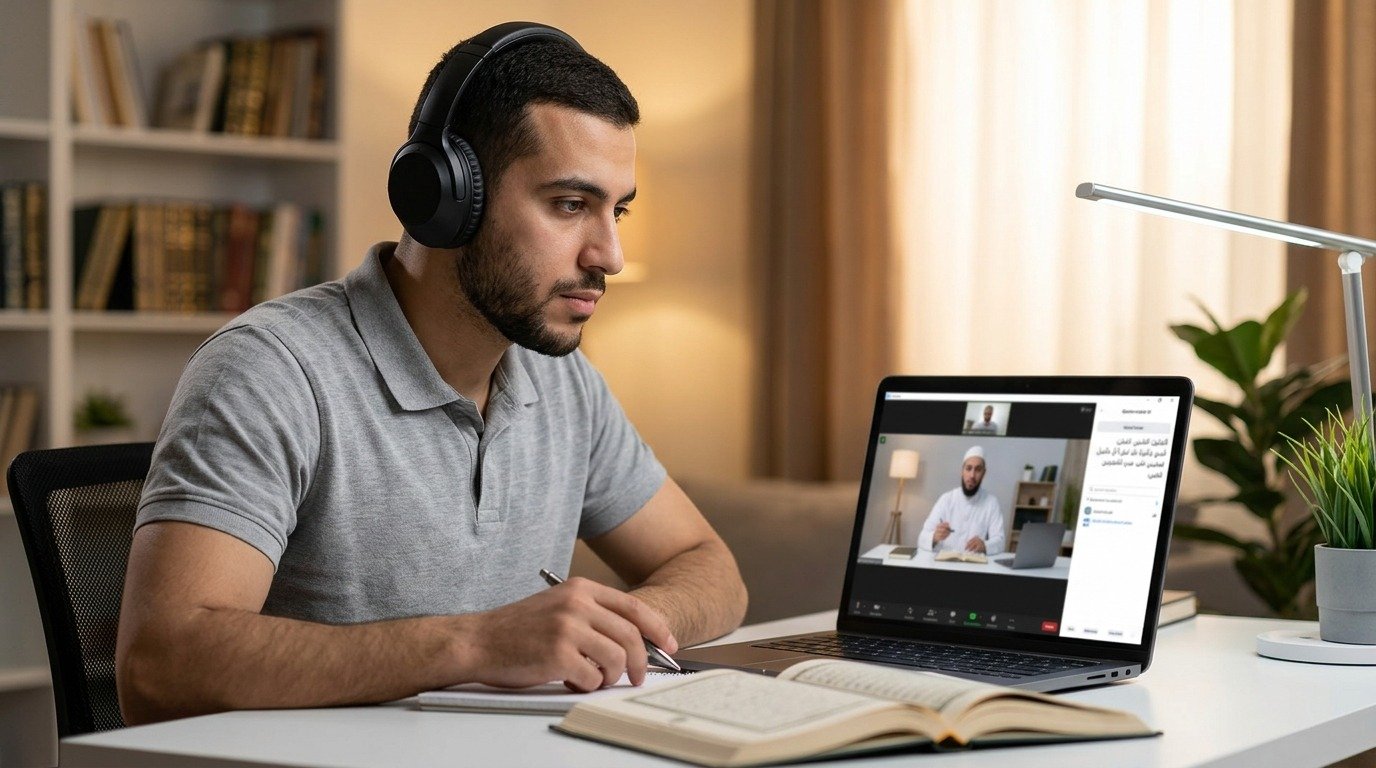
A laptop, tablet, or smartphone with a working camera and microphone covers the core requirement. Most devices made in the last several years handle this without any issue. A larger screen, like a laptop or tablet, tends to be easier for reading text comfortably during a session compared to a small phone screen, though a phone works perfectly well in a pinch.
Essential: A Stable Internet Connection
A reasonably stable broadband connection is genuinely important, since a connection that frequently drops or lags can interrupt the flow of a lesson and make it harder for a teacher to hear pronunciation clearly. Most standard home internet plans are more than sufficient for a single video call, though it helps to avoid running large downloads or multiple video streams simultaneously during a lesson.
Essential: A Physical Mushaf or Reading Text
Having an actual physical copy of the Quran or the specific foundational text being used, such as a Noorani Qaida for beginners, matters more than people sometimes expect. Reading from a real physical page, rather than a small image on a screen, tends to be easier on the eyes and closer to the eventual goal of comfortable independent reading.
Helpful But Not Essential: A External Microphone or Headset
A basic headset or clip-on microphone noticeably improves audio clarity compared to a laptop's built-in microphone, which can sometimes pick up background noise or muffle subtle pronunciation details a teacher needs to hear clearly. This is a genuinely worthwhile small investment, though it is not strictly required to get started.
Helpful But Not Essential: A Stand or Mount for the Device
Holding a phone or tablet by hand throughout an entire lesson gets tiring and often results in a shaky, hard-to-see picture. A simple stand or mount, even an inexpensive one, keeps the camera steady and at a consistent angle, which matters for a teacher trying to observe mouth shape and reading posture clearly.
Helpful But Not Essential: Good Lighting
Sitting facing a window or a lamp, rather than with a bright light source behind you, makes a noticeable difference in how clearly a teacher can see your face and mouth during Tajweed correction. This costs nothing beyond simply adjusting where you sit for each session.
Optional but Nice: A Dedicated Quiet Space
While not equipment in the traditional sense, having a consistent, quiet spot set aside for lessons makes a real difference in both focus and audio quality. A corner of a bedroom, a home office, or even a quiet spot at a kitchen table, used consistently each session, helps a student settle into a routine faster than moving to a different noisy location every time.
Background noise, whether from a television in another room, siblings playing nearby, or street noise through an open window, can genuinely interfere with a teacher's ability to hear subtle pronunciation details. Closing a door or choosing a quieter time of day when this is a consistent issue solves most of this without requiring any additional purchase.
Optional but Nice: A Second Device for Screen Sharing or Notes
Some families find it useful to have a second small device or a notebook nearby for jotting down what a teacher corrects during the lesson, keeping the main device fully focused on the video call itself. This is entirely optional, and plenty of students simply remember or ask the teacher to repeat key points at the end of a session instead.
What Software or App Is Typically Required
Most online Quran programs use a common video calling platform that a family likely already has installed or can download for free within a couple of minutes. There is rarely any need for specialized software beyond a standard video calling application, and setup instructions are typically provided clearly before a first lesson to avoid any last minute technical confusion.
What About Younger Children Who Cannot Manage a Device Independently
For young children, a parent or older sibling often needs to help set up the call and may need to stay nearby, at least for the first several sessions, to help with any technical hiccups and to keep the child focused on the lesson itself. This is less about equipment and more about a bit of extra hands-on support during the earliest sessions while a child grows familiar with the format.
How Much Should You Expect to Spend on New Equipment

For most families, the honest answer is very little to nothing at all, since a smartphone or laptop already in the household typically covers every essential requirement. Families wanting to invest a bit further in a better experience might spend a modest amount on a basic headset, usually available very affordably, and an inexpensive phone or tablet stand, also widely available at low cost. Beyond these two small optional upgrades, there is rarely any further equipment expense to plan for.
Testing Your Setup Before the First Real Lesson
It is worth doing a short test call with a friend or family member before an actual first lesson, checking that the camera angle shows your face and mouth clearly, that the microphone picks up your voice without excessive background noise, and that the internet connection holds steady for at least ten or fifteen minutes without dropping. This brief test avoids the awkwardness of troubleshooting technical issues during the actual first session with a new teacher.
What to Do if Your Internet Connection Is Genuinely Unreliable
If home internet is a known weak point, a few practical fixes often help considerably. Sitting closer to a home router rather than in a far corner of the house, closing other applications or devices using bandwidth during the lesson, and scheduling lessons during times of day when household internet use is generally lower can meaningfully improve call stability without requiring any change to an internet plan itself.
For households with a persistently poor connection despite these adjustments, upgrading an internet plan or router is sometimes worth the investment given how central a stable connection is to the entire online learning experience.
A Simple Pre-Lesson Checklist to Run Through Each Time
Device charged or plugged in, check. Quiet space with the door closed if needed, check. Mushaf or reading text within reach, check. Good lighting facing you rather than behind you, check. Notification sounds silenced on the device to avoid interruptions mid-lesson, check. Running through this same short checklist before every session, especially in the early weeks, helps a new routine become automatic much faster than figuring it out fresh each time.
Should You Use a Phone, Tablet, or Laptop
Each device type has its own small tradeoffs. A phone is the most portable and often already has a perfectly good camera and microphone, though its smaller screen can make reading text or seeing detailed teacher demonstrations slightly more difficult. A tablet strikes a nice middle ground, offering a larger screen while remaining easy to prop up on a stand at a comfortable angle. A laptop offers the largest screen and often the most stable connection to a home network, though it typically requires more careful positioning to get the built-in camera angled correctly toward your face.
There is no universally correct choice among the three. Many families simply use whichever device is already comfortable and familiar to them, since the differences between them matter far less than simply having a stable, well-positioned setup regardless of which device is chosen.
What About Students Learning Arabic Language Alongside Quran Reading
Students combining Quran reading with Arabic language study sometimes benefit from having a notebook specifically for vocabulary and grammar notes, separate from whatever tracking is used for Quran reading progress. This is a minor organizational suggestion rather than a strict requirement, and many students manage perfectly well with a single combined notebook for everything.
Handling Multiple Children Sharing a Single Device
Families with more than one child learning online but only one suitable device available sometimes need to schedule lessons at different times to avoid a direct conflict. If budget allows, a second inexpensive device, even an older phone no longer used for its original purpose, can resolve this scheduling tension entirely, letting two children attend separate lessons simultaneously if needed.
Common Technical Problems and Quick Fixes
Choppy audio during a call is often resolved simply by moving closer to the home router or switching from a shared household wifi network to a wired connection if the device supports it. A blurry or dark video image is frequently fixed just by cleaning the camera lens and adjusting the room's lighting rather than needing any new equipment. A device that keeps disconnecting from a call may simply need a restart before the session begins, clearing out background processes that were quietly consuming bandwidth or memory.
Most technical hiccups families encounter in the first few weeks of online learning turn out to have simple, no-cost fixes rather than requiring new purchases, and teachers experienced with online instruction are usually happy to help troubleshoot a persistent issue during the first few sessions.
Do You Need to Pay for a Premium Video Calling Service
Almost never. Most programs work perfectly well with free versions of standard video calling platforms, and there is rarely any need to pay for a premium subscription specifically for the purpose of attending Quran classes. If a specific program requests a particular platform, it is worth confirming with them directly whether any paid features are actually required or whether the free tier fully covers what a typical lesson needs.
Preparing an Older Child or Teenager's Own Setup
Older children and teenagers can typically manage most of their own technical setup with only occasional help, and involving them directly in choosing their own quiet spot, testing their own microphone, and getting comfortable with the platform tends to build a sense of ownership over their own learning that can support motivation over the longer term as well.
What Equipment Adult Students Specifically Should Consider
Adult students, particularly those attending lessons around a work schedule, sometimes benefit from a slightly more dedicated setup than a casual family arrangement, simply because consistency of location and equipment tends to reinforce the seriousness and routine of the commitment. A specific chair, a specific desk spot, and a specific device reserved primarily for these sessions can help mentally separate lesson time from the rest of a busy day, even though none of this is strictly necessary from a purely technical standpoint.
Backup Plans Worth Having in Place
It is worth having a simple backup plan in mind for the occasional session where the primary device or internet connection fails unexpectedly. A phone with mobile data as a fallback, or knowing a neighbor's wifi network as a temporary alternative, can turn what might otherwise be a missed lesson into a brief delay instead. Communicating early with your teacher when a technical issue arises, rather than simply not showing up without explanation, also helps maintain a good working relationship over the long term.
A Word on Screen Time Concerns for Children
Some parents worry about adding more screen time to a child's day through online Quran lessons, on top of school and other digital activities. It is worth reframing this specific screen time as fundamentally different from passive entertainment screen time, since it involves live, interactive, focused learning with real human connection rather than passive consumption. Many parents find this distinction genuinely reassuring once they see the actual structure and engagement level of a typical live lesson.
Final Practical Recap
To summarize the truly essential list one more time: a device with camera and microphone, a reasonably stable internet connection, and a physical copy of the reading material being used. Everything else covered in this article, headsets, stands, dedicated quiet spaces, backup plans, represents genuine improvements to the experience without being strict requirements to begin.
How This Compares to the Cost of Setting Up for In-Person Alternatives
It is worth briefly comparing this modest equipment list to what an in-person alternative might actually require once all costs are considered. A traditional weekend school often involves fuel or transportation costs, sometimes registration fees for materials, and the ongoing time cost of driving discussed in more detail elsewhere. By comparison, the one-time equipment cost for online learning, often effectively zero if a household already has a suitable device, tends to be considerably lower over the course of a full year of instruction.
Not sure how this looks for your family? Our online Quran classes in Philadelphia and online Quran classes in Detroit pages explain the setup.
What Happens When a Device Eventually Needs Replacing
Over the span of a multi-year learning journey, it is reasonable to expect that a phone or laptop used for lessons will eventually need replacing due to normal wear or an upgrade cycle unrelated to the Quran classes themselves. This is a normal part of owning any piece of technology and rarely disrupts the learning itself, since any reasonably current replacement device will meet the same basic camera, microphone, and internet requirements without needing any special consideration.
A Note on Accessibility for Families With Limited Resources
For families genuinely concerned about equipment costs, it is worth knowing that the bar for adequate equipment is quite low, and a basic, older smartphone paired with a household's existing internet connection is usually entirely sufficient to begin. Programs are generally happy to discuss specific concerns about equipment limitations directly, and in many cases a modest, older device performs perfectly well for the purposes of a live, focused Quran lesson.
Setting Up Once and Reusing the Same Routine Going Forward
One advantage worth mentioning is that most of this setup work happens only once. After the first week or two of finding the right spot, testing the equipment, and settling into a comfortable routine, the same setup typically works session after session with little further adjustment needed. This is quite different from an ongoing weekly logistical effort, since the equipment and environment side of online learning tends to become essentially automatic fairly quickly.
What to Ask a Program Before Your First Lesson
Before a first lesson, it is reasonable to ask a program directly which video platform they use, whether any specific settings or downloads are recommended in advance, and what to do if a technical issue arises during a scheduled session. Getting clear answers to these practical questions ahead of time removes most of the uncertainty a new student might otherwise feel walking into an unfamiliar format for the first time.
None of the practical details covered in this article should feel intimidating. The equipment barrier to starting online Quran classes is genuinely low, far lower than many families assume before actually looking into it, and the small amount of setup effort required upfront pays off quickly once a comfortable, consistent routine takes hold.
If you have been putting off starting because you assumed you would need to buy something special first, take this as confirmation that whatever device is already in your home is very likely sufficient to begin exactly where you are.
A device, a decent internet connection, and a physical copy of the text you plan to read are really all it takes to get started, with everything else on this list simply available as an optional upgrade whenever you decide it is worth adding.
Set aside a quiet corner, prop up your device where you can see and be seen clearly, keep your Mushaf close at hand, and the technical side of things will very quickly become the least demanding part of the entire learning journey ahead of you.
What actually determines success from here has far more to do with consistency, patience, and the quality of your teacher than with any piece of equipment sitting on your desk.
Get the basics in place, run a quick test call, and you will be ready to focus entirely on the actual learning rather than worrying about the technology carrying it.
That readiness, more than any specific gadget, is really what this checklist has been about all along.
Whatever device you already own is very likely enough, and the rest of this journey depends far more on showing up consistently each week than on anything you might still feel tempted to buy first.
Start with what you have, adjust along the way if needed, and let the actual lessons, not the equipment list, become the real focus of your attention from here forward.
With the practical side settled, all that remains is scheduling that first lesson and letting the actual learning begin.
Everything on this list is easy to gather in a single afternoon, and once it is in place, it rarely needs another thought for the remainder of the journey ahead.
So gather what you need, run through the checklist once, and get ready to spend your energy on the recitation itself rather than on anything technical standing in its way.
That, in the end, is the whole point of keeping the equipment side simple: so the actual learning can take center stage from your very first lesson onward.
Bringing It Together
The genuinely essential list is short: a device with camera and microphone, stable internet, and a physical reading text. Everything beyond that improves the experience without being strictly required to start. Families worried that online learning demands expensive or complicated technology can rest assured that most households already have everything necessary sitting in a drawer or on a desk. If you have questions about what specifically works best for a particular device or setup, reach out through the contact page before your first lesson.
Add New Comment